
Using other tools in your jobs
Mix your tools with XIV MCP's own and other plugins' in one job, and declare what your jobs need.
A job is not limited to your own tools. Any step can call any tool XIV MCP offers:
| Kind | Examples | Comes from |
|---|---|---|
| Your tools | myplugin_farm | Your plugin |
| XIV MCP's core tools | navigate_to, sell_item, get_currencies | XIV MCP |
| Integration tools | run_duty, gather_until, run_crafting_list | XIV MCP, driving AutoDuty, GatherBuddy Reborn, Artisan and others |
| Other plugins' tools | otherplugin_scan | Another third-party plugin |
So your plugin can do its own part and leave the rest to tools that already exist: walk to a bell with navigate_to, sell with sell_item, or call another plugin's tool.
var job = mcp.StartJob("Farm, sell, report",
    new McpJobStep("myplugin_farm", new { minutes = 60 }, Id: "farm"),
    new McpJobStep("navigate_to", new { destination = "summoning_bell" }),
    new McpJobStep("sell_item",
        new { retainer = "My Retainer", item = "{{farm.item}}" }),
    new McpJobStep("otherplugin_announce",
        new { text = "Sold {{farm.count}} {{farm.item}}." }));
Results pass between steps with placeholders, whichever plugin a step belongs to. A complete plugin that does this is on Example: a job across plugins.
Who decides what a step may do
Each step is checked against the settings of the tool it calls, not against your plugin's:
- XIV MCP's tools follow their module in
/xivmcp→ Modules. A job of yours can only walk to a bell if the player allows Game & navigation changes, or approves the step when it asks. - Another plugin's tools follow that plugin's settings: the player must have enabled it, and its capabilities decide. It is checked for side effects as if it had been called on its own.
- Your own tools follow your plugin's settings, as always.
Your plugin itself must be enabled to start jobs at all. A job never gives a tool more than the player allowed for it.
When a tool is missing
StartJob checks every step before it starts anything. It refuses the whole job, with a message, when a step's tool:
- does not exist (a typo, or a plugin that is not installed);
- is not available right now: its plugin is not loaded, or the player has not enabled it in XIV MCP;
- is turned off in
/xivmcp→ Modules.
XIV MCP's own tools need no plugin to run. Some hand a part to a plugin when it is installed, and otherwise ask the player to do it: navigate_to without a walking plugin flags the spot and waits for the player to walk there. A job with such a step is not refused, but that step waits for the player. Problems that only show while a step runs, such as a vendor that is not there, make the step fail and the job wait as pending.
Declaring your dependencies lets the player see all of this before they start anything.
Declaring the tools your jobs use
Call UsesTools once at startup, next to AddTool:
mcp.UsesTools(
    // XIV MCP's own tools: the name is enough.
    McpDependency.BuiltIn("navigate_to"),
    McpDependency.BuiltIn("sell_item"),
    // Another plugin's tool: who provides it, where to get it,
    // and the oldest version that has it.
    McpDependency.FromPlugin(
        tool: "otherplugin_announce",
        plugin: "OtherPlugin",
        pluginName: "Other Plugin",
        repo: "https://example.com/repo.json",
minVersion: "1.2.0"));| Field | For | Required |
|---|---|---|
tool | The tool's name, as it is called in a job step | Always |
plugin | The other plugin's internal name (InternalName in its manifest) | For another plugin's tool |
pluginName | Its name as players see it in the plugin installer | For another plugin's tool |
repo | The https:// URL of the repo.json it is installed from, or "official" for Dalamud's main repository | For another plugin's tool |
minVersion | The oldest version that has the tool as you use it, such as "1.2.0" | For another plugin's tool |
- Built-in tools take no plugin fields. XIV MCP knows which plugins its tools need or can use, and keeps that list up to date: see Plugins XIV MCP uses. Naming a plugin for a built-in tool is refused.
- A name XIV MCP does not know is treated as another plugin's tool, so a typo in a built-in name asks for the plugin fields. The error message says so.
- Calling
UsesToolsagain replaces the list. The client declares it again whenever XIV MCP loads, like your tools. - Declaring is not consent. It does not ask the player for anything, and does not allow anything. It only shows them what your jobs need.
What the player sees
Your plugin's card in /xivmcp → Third-party plugins gets a Tools its jobs use section, with one row per declared tool:
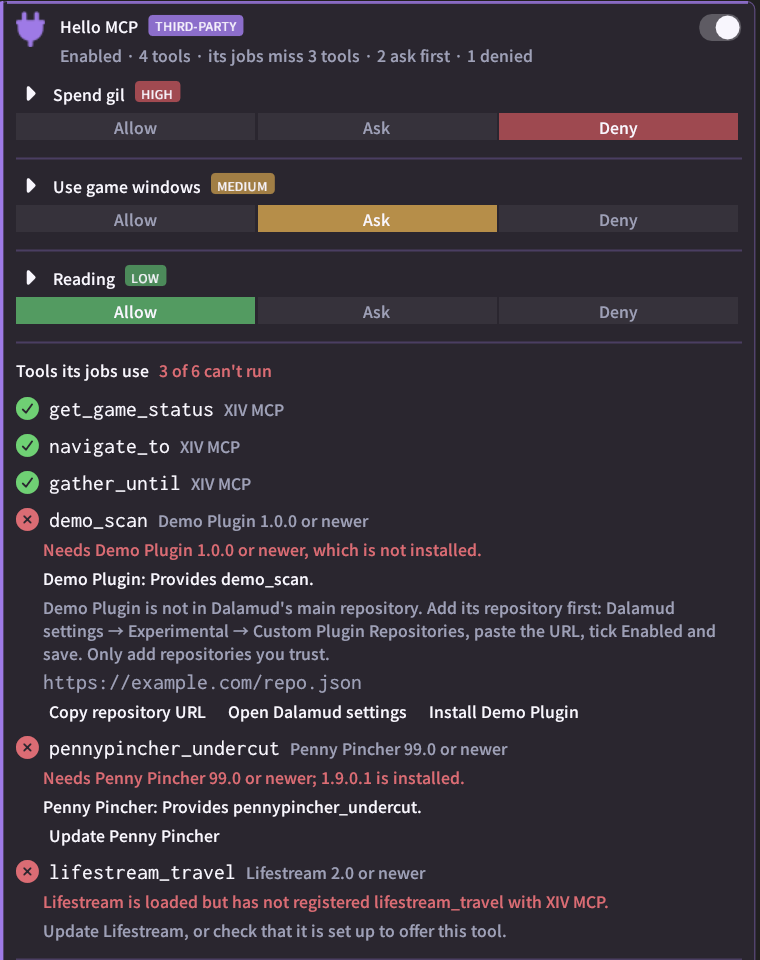
| State | Shown as | The player can |
|---|---|---|
| Ready | Green check | Nothing to do |
| An integration tool's plugin is missing | Error, with the plugin and what it is needed for | Install it (Dalamud's main repository), or copy its repository URL and open Dalamud's settings to add it first |
| Another plugin is not installed | Error, with its name, version and repository | The same |
| Installed, but turned off in Dalamud | Error | Enable it in the plugin installer |
Older than minVersion | Error, with both versions | Update it |
| Loaded, but the tool is not registered | Error | Update or reconfigure that plugin |
| Not enabled in XIV MCP | Error | Show that plugin's card, to enable it |
| A plugin one of XIV MCP's own tools can use is missing | Hint, not an error, with what XIV MCP does without it | Install it if they like, or do that part themselves |
The tab label and the card summary count the tools that cannot run. XIV MCP never adds a plugin repository on its own; the player does that in Dalamud's settings.
Reading the state in your plugin
GetStatus() returns the same states, so your own UI can explain them too:
// Log is your plugin's IPluginLog.
foreach (var d in mcp.GetStatus().Dependencies.Where(d => !d.Ok))
    Log.Warning($"Our jobs need {d.Tool}: {d.Message}");
What each state means is in the client reference.
Good practice
- Declare every tool your jobs use that is not your own, even ones that need no plugin. If XIV MCP later gives that tool a plugin, the player is told.
- Pick the lowest
minVersionthat works, so players are not asked to update without need. - Give the repository players really install from. XIV MCP shows it to them as it is, and they decide whether to trust it.
- Check before you start a job, with
GetStatus().Dependencies, and say in your own UI what is missing, instead of only failing. - Do not depend on another plugin's internals. Use the tools it offers through XIV MCP; their names and arguments are its public contract.