
Background jobs
Queues of steps that XIV MCP runs in the game, one after another, for as long as they take.
A job is a queue of tool calls that XIV MCP runs in the game, one after another, for as long as they take. It does not depend on the chat or the connection: you can close your AI app and the job keeps going.
| Tool | What it does |
|---|---|
start_job | Starts a job with its steps (tool and arguments). Later steps can use earlier results. |
list_jobs / get_job | Jobs with state, progress and the current step; one job's steps, results, errors and log |
update_job | For a pending or paused job: retries or skips the current step, adds steps or replaces the remaining ones |
pause_job / resume_job / cancel_job | Controls a job |
wait | A step that waits a number of seconds, or until a time |
Step by step or as a job
Your assistant can get a task with several steps done in two ways:
| Step by step | As a job | |
|---|---|---|
| Tokens | Every call and every result costs tokens. Waiting costs the most: to know whether something has happened, the assistant keeps asking. | Starting costs one call. The steps cost nothing. |
| Surprises | Handled as they come: full bags, a missing NPC, a price that moved. The assistant sees every result and adapts. | The job follows its plan. Something unexpected stops the step, and the job waits as pending until your assistant fixes it. |
| Long tasks | Each call has to finish within your app's time limit for one call, often a minute. | Steps can take hours. |
| The chat | Has to stay open. | Can be closed. |
Your settings in /xivmcp apply the same way to both.
What to ask for:
- For long or repetitive work, say "run it as a job": farming a dungeon, gathering and crafting a list, a route with several stops. It is far cheaper, and keeps going without the chat.
- For work that needs judgement, let the assistant go step by step, or ask it to check with you: selling at good prices, sorting out a full inventory, anything where the next step depends on what just happened.
- Mixing both works well. The assistant can look around step by step, start a job for the long stretch, and decide what to do with the result.
In the game
/xivmcp → Jobs lists every job with its progress, and has Pause, Resume and Cancel buttons. Your standing spending approvals are listed there too.
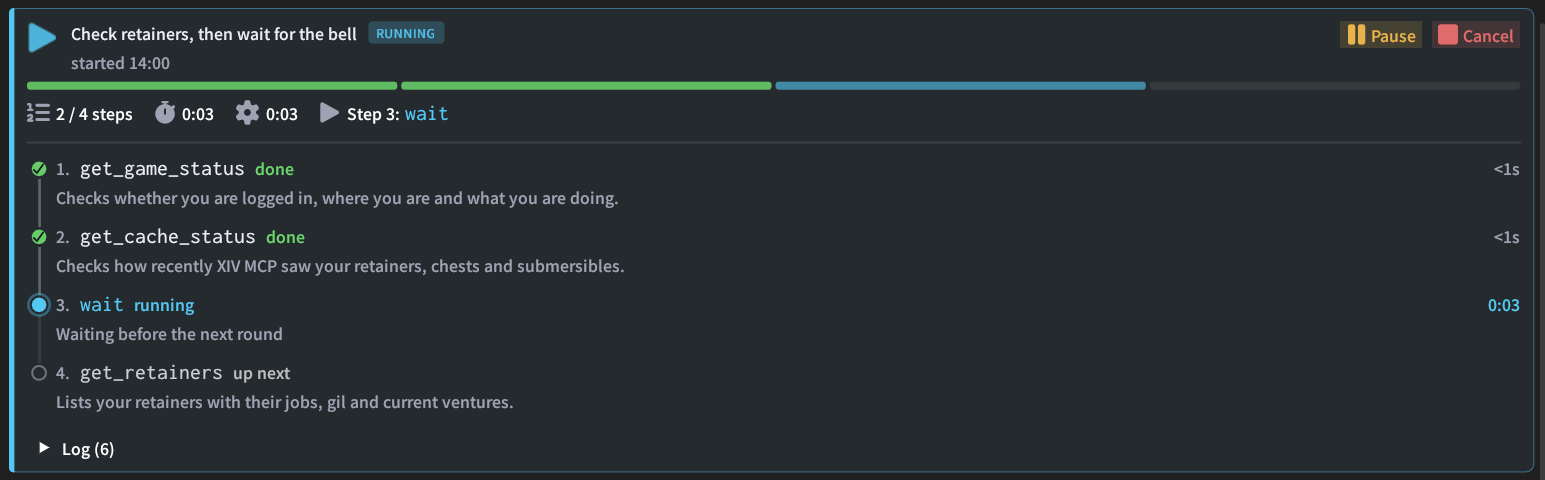
How jobs behave
- Each step needs its own permission. A step set to Ask waits for you. A step whose module is denied fails.
- One acting step at a time. While a step runs, other tool calls that change something are refused, so they cannot collide with the job. Tools that only read are not blocked by a running step, and neither are waiting steps such as routes. They still follow their own settings.
- Failures wait for a fix. When a step fails or is stopped, XIV MCP first gets your character out of any conversation or window the step left open (see
recover_game_state), then the job becomes pending and waits for your assistant to retry, skip or change it. - Jobs survive reloads. After a plugin reload, jobs come back paused.
Passing results along
A string argument "{{stepId.path}}" takes the value from an earlier step's result, keeping its type. Inside a longer string, as in "Made {{craft.crafted}} pies", it is replaced by the value as text.
Example: prepare_craft_plan (step id plan) → gather_until for the missing materials → run_crafting_list with "list": "{{plan.list.id}}".