
Modules and permissions
Choose what XIV MCP's own tools may do, per module and per tool, in /xivmcp → Modules.
XIV MCP has two permission screens, because there are two kinds of tools:
| What | Where | How it is controlled | |
|---|---|---|---|
| XIV MCP's own tools | The core tools, plus the integrations XIV MCP maintains for other plugins | /xivmcp → Modules | Per module, reading and changes separately: allow, ask or deny |
| Third-party tools | Tools other plugins register through the plugin API | /xivmcp → Third-party plugins | Per plugin, capability and tool, with consent and automatic suspension. See Third-party plugins. |
This page is about the first kind.
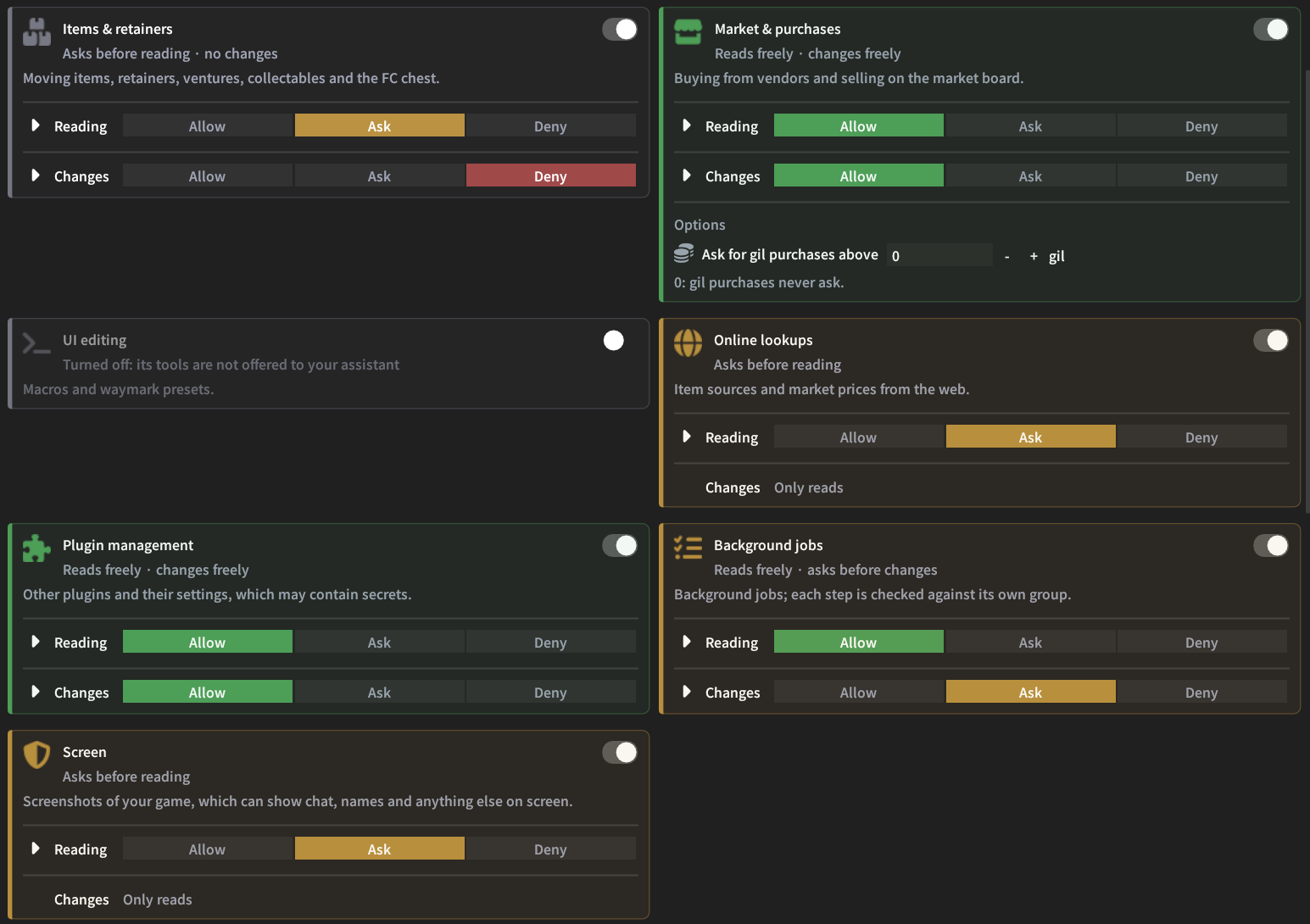
Allow, ask or deny
Every tool belongs to one module, and every module has two settings: Reading (tools that only look) and Changes (tools that act in the game or edit something). Each setting is one of:
- Allow runs the tool.
- Ask shows the approval window first. You can approve once, approve for this session (until the game or XIV MCP restarts), always allow (which sets just that tool to Allow), or decline. See Approvals in the game.
- Deny refuses the tool before it runs, and tells your assistant which setting to change.
How a call is decided
The modules and their defaults
| Module | Reading | Changes | Covers |
|---|---|---|---|
| Game data | Allow | — | Character, jobs, gear, inventory, currencies, quests and unlocks, party and surroundings, collections, game data, caches, the self-test |
| Game & navigation | Allow | Deny | Game windows and menus, NPCs and objects, walking and travel, world visits, logging into other characters, gear sets, leaving duties, placing waymarks, map flags and routes |
| Items & retainers | Allow | Deny | Sorting and moving items, crystals and gil, retainers and their inventories, ventures (recalling one always asks in the game), collectable turn-ins, the FC chest |
| Market & purchases | Allow | Deny | Buying from vendors (anything not paid in gil also asks in the game), selling and repricing, sale histories, spending approvals |
| UI editing | Allow | Deny | Macros and the waymark preset slots |
| Online lookups | Deny | — | Item sources (FFXIV Teamcraft, ffxiv.consolegameswiki.com), market prices (universalis.app) and fishing data (the FFX|V Fish Tracker and FFXIV Teamcraft) |
| Plugin management | Deny | Deny | Turning plugins on and off, reloading them, reading and changing their settings (which may contain passwords or keys) |
| Trading | Allow | Deny | Trading items and gil with other players. Every trade asks you in the game, with what both sides hold, and cannot be allowed permanently. |
| Background jobs | Allow | Allow | Starting and controlling jobs. Every step is still checked against its own module. |
| Screen | Ask | — | Screenshots of the game or of XIV MCP's window. They can show chat, tells and other players' names, so each one asks you first. |
These are only the defaults. Reading is a setting like any other: set it to Ask to approve every look at your game, or to Deny to refuse it. Switch a module off to remove its tools entirely.
The tools reference lists every tool of every module.
Single tools
Each card's Reading and Changes rows expand (the arrow on the left) into their tools, each with a short description and its own setting: Group, Allow, Ask or Deny.
- Group (the default) follows the module's setting.
- Anything else overrides it for that tool, in both directions: allow one tool of a denied module, or ask before one tool of an allowed module.
The card's summary says how many tools are set on their own. Hover a module's name to see its tools.
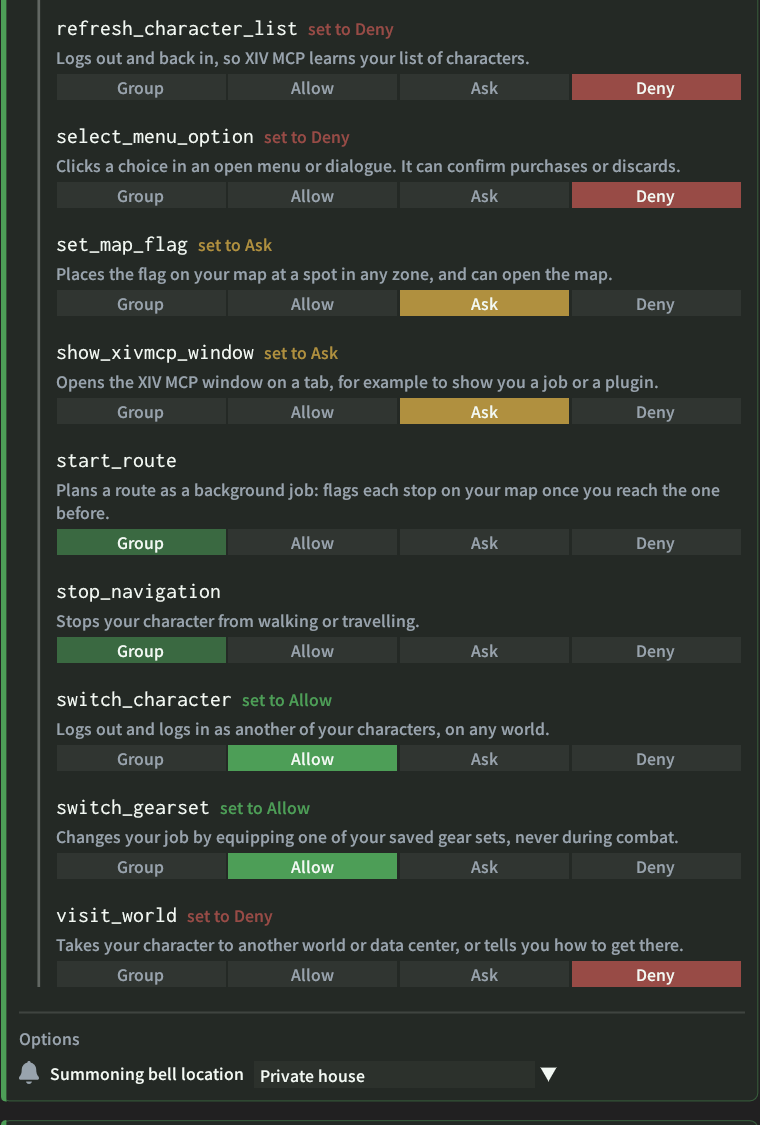
Extra options
Some modules have extra options while their changes are not denied:
- Game & navigation: Summoning bell location, where
navigate_togoes for a bell when none is nearby: Inn room, Free company house, Private house or Apartment, or, with Lifestream, Lifestream's preferred property (the default). Without Lifestream, the default means the inn. If the place has no bell, it goes to the inn instead. - Items & retainers: Pause between moves, a random pause between item moves (500 to 800 ms by default).
- Market & purchases: Ask for gil purchases above: a gil purchase that costs more than this in total also asks you first. At 0 (the default), gil purchases never ask.
Turning a module off
The switch in each card's top right removes the module's tools from your assistant entirely:
- They disappear from its tool list (apps are told the list changed).
- Calls and job steps are refused.
- The card shows only its description.
Unlike Deny, which keeps the tools listed so your assistant can tell you they are blocked, this keeps your assistant's tool list short, and every request a little cheaper. Turn the module back on to bring its tools back with their settings.
Integrations
Tools whose whole purpose is driving one other plugin have their own module, listed under Integrations maintained by XIV MCP for each installed plugin:
| Integration | Reading | Changes |
|---|---|---|
| AutoDuty | Allow | Deny |
| Gold Saucer (Saucy, or TriadBuddy for reading) | Allow | Deny |
| AutoHook | — | Deny |
| Ocean fishing (Distant Seas; the voyages need AutoHook) | Allow | Deny |
| Custom Deliveries (Satisfier) | Allow | Deny |
| Artisan | Allow | Deny |
| GatherBuddy Reborn | Allow | Deny |
| Item Vendor Location | Allow | — |
| FCCH | — | Deny |
| Questionable | Allow | Deny |
They are independent of the core modules: AutoDuty can run dungeons while Game & navigation changes are denied, for example. They are only offered while their plugin is loaded, except for parts that work without it: the Fashion Report in Gold Saucer, and the schedule, boarding and voyages in Ocean fishing. XIV MCP maintains and trusts them like its own tools.
Searching
The search field at the top of the Modules tab filters as you type. It matches module names and descriptions, and tools by name or by what they do. Every word has to match. Modules with matching tools open those rows and show only the matching tools.
Recent activity
/xivmcp → Info → Recent activity lists what XIV MCP's own tools changed, and every call that was asked or blocked. Allowed reading is not listed.
Older settings
Settings from earlier versions carry over: a switch that was on allows its module's changes.